The best clipboard manager for Mac should remove interruptions without becoming another place you have to organise all day. A private Mac clipboard manager should also make its storage and permission boundaries easy to understand.
There is no honest single winner for every Mac. The useful choice depends on whether you want the built-in option, a free history tool, cross-device sync, or a focused local workflow for material you paste repeatedly.
The 2026 shortlist
| If you need… | Start with | Why it belongs on the shortlist | Read this before deciding |
|---|---|---|---|
| Recent history with no extra app | Apple Clipboard History | Built into macOS Tahoe, with Spotlight search for recent clipboard items. | It requires Tahoe or later, and you still return to the destination to paste. |
| A free, standalone history manager | Maccy | Free, open source, local, and designed around fast keyboard search of clipboard history. | It is intentionally history-first rather than an app-specific reuse system. |
| Clipboard access across Mac, iPhone, and iPad | Paste | Searchable history and iCloud sync are designed for work that moves between Apple devices. | Its free offering is a trial, not an ongoing free plan. |
| A private Mac workflow for recent copies and deliberate reuse | WhatTheClip | Separates recent history from App Profiles and numbered favourites in a keyboard-led workflow. | It is for one-Mac working material, not cloud sync or long-term archival storage. |
Apple documents Clipboard History in Spotlight; Maccy and Paste describe their current products on their own sites. Those links are worth checking before you choose because features and pricing can change: Apple Clipboard History, Maccy, and Paste.
In 2026, the choice starts with a new question: is the built-in Clipboard history in macOS Tahoe already enough for you?
Apple now lets Tahoe users browse recent text, images, links, and files from Spotlight with Command-Space followed by Command-4. A third-party app needs to add something genuinely useful beyond that baseline.
1. Start with your real clipboard problem
Most clipboard needs fall into three groups:
- Recovery: find something you copied recently.
- Reuse: keep content you paste repeatedly.
- Flow: retrieve and paste without leaving the active task.
If you only need recovery and you use Tahoe, try Apple's built-in history first. If you repeatedly use support replies, code snippets, links, images, or files, look for a product that separates recent history from intentional favourites.
If free history is the priority, start with the free Mac clipboard manager guide. If you are choosing between a focused app and a specific alternative, read the WhatTheClip vs Maccy comparison or WhatTheClip vs Paste comparison. Each explains which workflow it is designed for rather than declaring one app best for everyone.
2. Check whether favourites have structure
Pinning an item is useful. App-specific favourites are more focused.
A Mail profile might contain follow-ups and invoice notes. A coding profile might contain review comments and terminal snippets. A design profile might hold approved copy, a logo file, and a current handoff link.
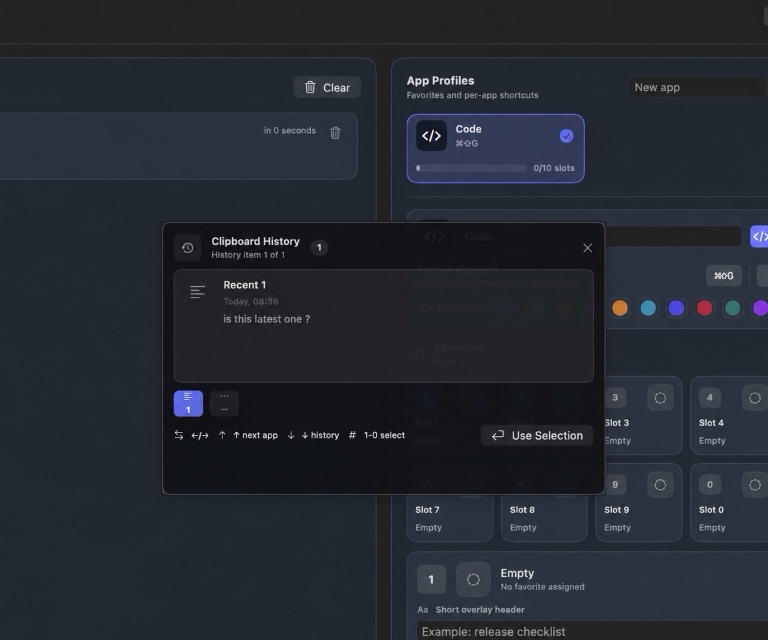
This is one of WhatTheClip's clearest differences: it combines multiple App Profiles with 10 numbered favourite slots per profile, so deliberate reuse has a different home from recent history.
3. Test the keyboard workflow
A clipboard manager can have every feature and still feel slow.
Look for a keyboard path that answers four questions:
- How do you open it?
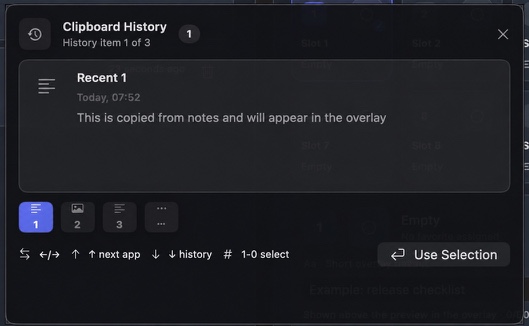
- Can you move through recent items without the mouse?
- Can you switch to favourites quickly?
- Does the selected content return to the app you were using?
The WhatTheClip website walkthrough supports Command-Shift-V, arrow keys, number keys, Enter, and Escape. It simulates the workflow without reading or uploading your real clipboard.
4. Compare the content types honestly
Not every plan needs every payload type.
Text and links cover many everyday workflows. Local files help with handoffs. Images and screenshots matter for design, support, documentation, and product work, but they also require more storage and clearer previews.
WhatTheClip handles text, links, images, screenshots, and local files, with image compression presets for saved image favourites. A clear limit is better than a feature that appears in the interface but fails when you need it.
5. Read the privacy boundary, not just the slogan
“Local-first” should answer specific questions:
- Is clipboard content uploaded for processing?
- Is cloud sync on by default?
- Are product analytics enabled?
- Are stored payload files encrypted?
- Which titles, previews, and timestamps remain visible locally?
- Can you pause capture or clear local data?
WhatTheClip keeps managed payloads on the Mac, uses local encrypted payload storage, and currently has no CloudKit clipboard sync, remote clipboard processing, product analytics, or remote application logging. Its Privacy Policy explains the visible metadata boundary too.
6. Understand macOS permissions
Clipboard access, global shortcuts, and automatic paste are separate capabilities.
Accessibility may support user-triggered paste into another app. Input Monitoring may support global shortcuts and overlay navigation. File access should follow the files you copied or explicitly selected.
A trustworthy clipboard manager explains what stops working when a permission is off. Read WhatTheClip's macOS permissions guide before you decide.
7. Match the app to your macOS version
Apple's built-in Clipboard history requires macOS Tahoe or later. A third-party manager may support older releases, but you should verify the exact minimum version and processor architecture.
WhatTheClip supports Apple silicon Macs running macOS 14 or later.
8. Decide how much history you actually want
Unlimited history sounds attractive, but a clipboard is not a backup.
A bounded history is easier to scan and reduces the amount of sensitive material kept around. WhatTheClip keeps its configurable history focused on active work rather than an unlimited archive.
Important content still belongs in documents, source control, an asset library, or a password manager.
9. Review release status and support information together
Before installing any clipboard manager, check:
- Current availability and compatibility.
- Local-storage and privacy boundaries.
- Support and recovery information.
- Whether the workflow fits your actual Mac work.
WhatTheClip's Download page is the source of truth for release availability and Mac requirements.
The practical shortlist
Choose the smallest tool that solves your real workflow.
If Tahoe's built-in history covers recent recovery, use it. If you want local history plus app-specific favourites and a keyboard-first paste overlay, see WhatTheClip in action, review the full feature set, or check current download availability.
Test the awkward moment, not the feature list
Before paying for any clipboard manager, run one ordinary task through it. Copy a product link from Safari, a sentence from Notes, and a small image or file reference. Then return to the message, document, or editor where you needed them. The useful question is not “does it store clips?”—almost every manager does. It is whether retrieving one feels quicker than finding the original again.
Pay attention to the awkward details: Can you understand the item from its preview? Does the shortcut conflict with something you already use? Can you cancel cleanly? Does the destination receive a normal paste, or do you have to click through several windows? A feature comparison cannot answer those questions for your Mac.
Finally, decide what you do not need. Cross-device sync, very large archives, team sharing, image handling, and automation can each be excellent features. They are not automatically improvements for someone who mostly wants a few recent copies and a handful of repeat replies. The right tool feels smaller after you have used it, not larger.